Hola,
small post
I've added ShowEquipScreen event step.
It's a pretty simple event step with no parameter.
It's use is to show the equip interface and it's meant only for that.
In fact items that are not equippable are not shown.
This is useful if you need to change equipment mid-event
For example the slave might be unconfortable in her current dress and ask to be dressed differently before going out.
Remember the previous post about outlaw public nudity?
In that event if a guard stop you will ask to redress the slave before giving you a fine.
He gives you 3 warning if at the third the slave is still nude you will be forced to jail.
Bye bye!
Showing posts with label xmaker. Show all posts
Showing posts with label xmaker. Show all posts
Monday, August 1, 2016

Sunday, July 17, 2016
Activity features
Hello,
I added a new information to week activities.
Just to refresh your memory. What's a week activity?
A week activity is what youre gonna do during the week and that you can select during week planning.
The activities are defined inside an xml file.
And now when you define an activity you can declare a new information called Feature.
So, what's an activity feature?
An activity feature is just a piece of text that describe the activity. This description can be retrieved while the activity is running. This will be mostly useful for generic events and checks that might happen in the game.
But let's take an example,
in the Xmaker world, nudity is not allowed in public.
So, do I have to check in every activity if the slave is nude and if yes react?
Well, yes, if you have some custom event.
But in general you just want a default event to fire.
By default a guard will stop you and give you a fine / send you to jail.
I could easily add this event in the activity start hook, right?
Well, yes and no.
It's correct for this to be executed at the start of an activity, but not all activities are done in public or where guard are available...
I added a new information to week activities.
Just to refresh your memory. What's a week activity?
A week activity is what youre gonna do during the week and that you can select during week planning.
The activities are defined inside an xml file.
And now when you define an activity you can declare a new information called Feature.
So, what's an activity feature?
An activity feature is just a piece of text that describe the activity. This description can be retrieved while the activity is running. This will be mostly useful for generic events and checks that might happen in the game.
But let's take an example,
in the Xmaker world, nudity is not allowed in public.
So, do I have to check in every activity if the slave is nude and if yes react?
Well, yes, if you have some custom event.
But in general you just want a default event to fire.
By default a guard will stop you and give you a fine / send you to jail.
I could easily add this event in the activity start hook, right?
Well, yes and no.
It's correct for this to be executed at the start of an activity, but not all activities are done in public or where guard are available...
Enter the features
The solution can be found by using activity features.
By giving an activity the following features: Public place and Presided by guards (I hope it's correct english because I'm not really sure :/ )
Now in the activity start event we could check if the activity has both these features and in case give a fine or jail the player.
Okay, that it, bye people. Hope this will be useful for other things than the nudity check in the future.
Thursday, July 7, 2016
Finally the weekend arrive
Hi folks,
finally I added hooks for the events.
The hook are fired when a week start or end and when an activity start or end.
What's the idea behind this?
Well, mostly it's needed to do some common checks on the state of the game for example, during the week end (which was actually the only hook already implemented) I check for game over conditions.
The next step will be to add a way to check the current activity data, this will open a world of new opportunity (just exaggerating).
For example, once you know that an activity is done in a public place, before the activity start, I could check whether the slave is nude (public display is against the law in the game) and if so a random event might trigger, were the guard give you a fine or take you to the prison (and you know what will happen in prison to your slave right?)
Anyway that's it for now.
finally I added hooks for the events.
The hook are fired when a week start or end and when an activity start or end.
What's the idea behind this?
Well, mostly it's needed to do some common checks on the state of the game for example, during the week end (which was actually the only hook already implemented) I check for game over conditions.
The next step will be to add a way to check the current activity data, this will open a world of new opportunity (just exaggerating).
For example, once you know that an activity is done in a public place, before the activity start, I could check whether the slave is nude (public display is against the law in the game) and if so a random event might trigger, were the guard give you a fine or take you to the prison (and you know what will happen in prison to your slave right?)
Anyway that's it for now.
Saturday, May 21, 2016
Stackable items
Hi, it's been a really long time since the last post.
I'm not even sure someone still look at this, but who cares.
Anyway, you probably wondering what happened to me.
Well,
nothing really...
It just that I just didn't felt (is this the correct conjugation?) like working on the project.
Then why are you writing, you might ask.
Okay, let me explain.
I work like this:
I'm not even sure someone still look at this, but who cares.
Anyway, you probably wondering what happened to me.
Well,
nothing really...
It just that I just didn't felt (is this the correct conjugation?) like working on the project.
Then why are you writing, you might ask.
Okay, let me explain.
I work like this:
- I start a project.
- I work on it hard until I burn out or find another (more appealing) project.
- I stop working on the project.
- Time passes.
- ...
- ...
- ...
- ...
- ...
- I look on the old project and feel like I could continue.
- I work on it hard (but less than when I started) I burn out or find another (more appealing) project.
- I stop working on the project.
- And so on...
So, I felt like working a little more on this.
And in these days I added.
**roll of drums**
Nothing new...
Just kidding, I added stackable items.
I know it's probably exactly like nothing new for your perspective.
But hey, it's progress!
Items marked as stackable are grouped inside the inventory and in shop you might buy and sell them in bulk.
Wednesday, February 17, 2016
New facial expression: Sleeping


Wednesday, February 10, 2016


Wednesday, February 3, 2016
New facial expression : cry
Hi, in these days I added a some random events, mostly short and a couple medium sized.
One of those medium sized required some new expression that I still didn't had which is the crying one.

In the next days I'll need to add other two expression, an embarassed and a sleeping one, all required for the same event.
This is the first event that actually make use of facial expressions.
I should start use them more.
One of those medium sized required some new expression that I still didn't had which is the crying one.
In the next days I'll need to add other two expression, an embarassed and a sleeping one, all required for the same event.
This is the first event that actually make use of facial expressions.
I should start use them more.
Thursday, January 28, 2016
Trainee properties
Hello there,
I added a new event step.
A lot of time ago I added the SetGlobal event step, which let you to set a global variable that can be retrieved in the future.
That lead to have a PlayOnce event step which let you play a event only once during the whole game.
Well, now I added a similar event step but with a smalle scope.
The scope is the trainee and the event step is called SetTraineeProperty.
The event step works exactly as the setGlobal but it clearly require a trainee.
Here's an example:
<SetTraineeProperty Type="Bool" Key="trainee_happy">
[Trainee.Mind.Happiness] > 70
</SetTraineeProperty>
Okay, so to retrieve the value:
<SetText>Is trainee happy? !$expr{[Trainee.Property.Bool.trainee_happy]}</SetText>
This would led (if the trainee happiness is higher than 70) to the following result displayed on screen:
Is trainee happy? true
Anyway this led to add the PlayOncePerTrainee event step too, which has the same sintax as the PlayOnce event step:
<PlayOncePerTrainee CompletionKey="trainee_present_herself">
<SetText>!$trainee: Hello, I'm t!$trainee, pleased to meet you.</SetText>
</PlayOncePerTrainee>
Well, that's it for today.
I added a new event step.
A lot of time ago I added the SetGlobal event step, which let you to set a global variable that can be retrieved in the future.
That lead to have a PlayOnce event step which let you play a event only once during the whole game.
Well, now I added a similar event step but with a smalle scope.
The scope is the trainee and the event step is called SetTraineeProperty.
The event step works exactly as the setGlobal but it clearly require a trainee.
Here's an example:
<SetTraineeProperty Type="Bool" Key="trainee_happy">
[Trainee.Mind.Happiness] > 70
</SetTraineeProperty>
Okay, so to retrieve the value:
<SetText>Is trainee happy? !$expr{[Trainee.Property.Bool.trainee_happy]}</SetText>
This would led (if the trainee happiness is higher than 70) to the following result displayed on screen:
Is trainee happy? true
Anyway this led to add the PlayOncePerTrainee event step too, which has the same sintax as the PlayOnce event step:
<PlayOncePerTrainee CompletionKey="trainee_present_herself">
<SetText>!$trainee: Hello, I'm t!$trainee, pleased to meet you.</SetText>
</PlayOncePerTrainee>
Well, that's it for today.
Friday, January 22, 2016
Inside view
Hello there,
BEWARE: Long post ahead.
I'm happy to announce I'm working on a feature I tought I would add from the beginning.
As you probably know the "external view" was the only eye candy you get by playing the game.
Now finally I started working on the "internal view"
The internal view can be used to, uhm, inspect... Yes, that's a nice term...
Anyway to inspect the trainee closer.
So, let's start with the basic

Hmm...
Your probably wondering:
you: What the fuck is that?
(Actually I hope you are not wondering that, since that would mean I have to redraw that in the future)
To that question I respond with a:
me: It's a bottom
you: It doesn't look like a bottom
me: Fuck...
you: ...
you: ...
me: ...
you: and anyway is not much of an eyecandy.
me: Hmm...
me: You're right.
me: hmm
me: what about if I add...
me: Hmm
me: this?

you: ...
you: I don't understand. What's going on?
you: Why the colour changed all of a sudden?
me: Urhm, no need to notice that.
me: I'm still using that feature in test mode.
me: Each time I start the game the slave is generated randomly and the skin colour changes.
me: I had to restart the game to take the first picture because I forgot...
you: Hmpf, that's no excuse
you: And anyway why she has a missile stuck there?
me: It's not a missile, it's a test dildo

me: See? It has the "Test" symbol on it.
you: What the?
me: Yes, the internal view come with a xray view.
you: Hmm, that's interesting.
me: Another interesting thing about the game is that it support multiple penetration.
you: Well, every game do that.
me: I mean in a single hole

you: Uh, nice
Okay stop the conversation
I hope it sound interesting the whole internal view as a concept.
At the moment is still in very early phase, in the sense that I miss all possible drawing needed.
For starting I'll probably start by drawing three human dicks.
I'd like to add in the future different sized human dicks, monster and animal dicks.
Other interesting thing I'd like to add in the future (far away) is pregnancy (You will see the baby grow in the womb) and cum (which I know I probably can add in the vagina but for the anus I don't know I have kinda a logistic problem for displaying cum there...)
BEWARE: Long post ahead.
I'm happy to announce I'm working on a feature I tought I would add from the beginning.
As you probably know the "external view" was the only eye candy you get by playing the game.
Now finally I started working on the "internal view"
The internal view can be used to, uhm, inspect... Yes, that's a nice term...
Anyway to inspect the trainee closer.
So, let's start with the basic
Hmm...
Your probably wondering:
you: What the fuck is that?
(Actually I hope you are not wondering that, since that would mean I have to redraw that in the future)
To that question I respond with a:
me: It's a bottom
you: It doesn't look like a bottom
me: Fuck...
you: ...
you: ...
me: ...
you: and anyway is not much of an eyecandy.
me: Hmm...
me: You're right.
me: hmm
me: what about if I add...
me: Hmm
me: this?

you: ...
you: I don't understand. What's going on?
you: Why the colour changed all of a sudden?
me: Urhm, no need to notice that.
me: I'm still using that feature in test mode.
me: Each time I start the game the slave is generated randomly and the skin colour changes.
me: I had to restart the game to take the first picture because I forgot...
you: Hmpf, that's no excuse
you: And anyway why she has a missile stuck there?
me: It's not a missile, it's a test dildo

me: See? It has the "Test" symbol on it.
you: What the?
me: Yes, the internal view come with a xray view.
you: Hmm, that's interesting.
me: Another interesting thing about the game is that it support multiple penetration.
you: Well, every game do that.
me: I mean in a single hole

you: Uh, nice
Okay stop the conversation
I hope it sound interesting the whole internal view as a concept.
At the moment is still in very early phase, in the sense that I miss all possible drawing needed.
For starting I'll probably start by drawing three human dicks.
I'd like to add in the future different sized human dicks, monster and animal dicks.
Other interesting thing I'd like to add in the future (far away) is pregnancy (You will see the baby grow in the womb) and cum (which I know I probably can add in the vagina but for the anus I don't know I have kinda a logistic problem for displaying cum there...)
Sunday, January 17, 2016
Finally an If else that make sense
Okay,
this is a continuation to the previous post.
I wasn't happy with the IfElse element.
At start I was trying to decide whether it was better to let ifelse as it was or change it for this:
<If Expression="true">
<SetText>I will be displayed</SetText>
<Else>
<SetText>I won't be played</SetText>
</Else>
</If>
I'm still not sure this is better than the <IfElse> I described in the previous post.
So, I looked at how Slave Maker does it.
Here's a short excerpt:
<if gender='2'>
<Question event='CockOutOfHole'>Ask for a cock</Question>
<else>if</else>
<Question event='CockOutOfHole'>Ask for a cock</Question>
<Question event='CockIntoHole'>Stick cock into the hole</Question>
</if>
Well...
This, from my point of view, made even less sense than mine...
So, finally I decided to go with the normal way of doing an if else.
Here's the final version (I think) version:
<If Expression="false">
<SetText>I wont be displayed</SetText>
</If>
<Else>
<SetText>I will be displayed</SetText>
</Else>
I had to make a little more work since this was the first time I had to treat two sibling xml nodes as "one step"
Before all elements were evaluated singularly.
Anyway this gave me the opportunity to make an ElseIf too.
<If Expression="false">
<SetText>I wont be displayed</SetText>
</If>
<ElseIf Expression="true">
<SetText>I will be displayed</SetText>
</ElseIf>
<Else>
<SetText>I wont be displayed</SetText>
</Else>
Yay!
I'm pretty happy with this, since it's a lot more natural than the previous solutions.
this is a continuation to the previous post.
I wasn't happy with the IfElse element.
At start I was trying to decide whether it was better to let ifelse as it was or change it for this:
<If Expression="true">
<SetText>I will be displayed</SetText>
<Else>
<SetText>I won't be played</SetText>
</Else>
</If>
I'm still not sure this is better than the <IfElse> I described in the previous post.
So, I looked at how Slave Maker does it.
Here's a short excerpt:
<if gender='2'>
<Question event='CockOutOfHole'>Ask for a cock</Question>
<else>if</else>
<Question event='CockOutOfHole'>Ask for a cock</Question>
<Question event='CockIntoHole'>Stick cock into the hole</Question>
</if>
Well...
This, from my point of view, made even less sense than mine...
So, finally I decided to go with the normal way of doing an if else.
Here's the final version (I think) version:
<If Expression="false">
<SetText>I wont be displayed</SetText>
</If>
<Else>
<SetText>I will be displayed</SetText>
</Else>
I had to make a little more work since this was the first time I had to treat two sibling xml nodes as "one step"
Before all elements were evaluated singularly.
Anyway this gave me the opportunity to make an ElseIf too.
<If Expression="false">
<SetText>I wont be displayed</SetText>
</If>
<ElseIf Expression="true">
<SetText>I will be displayed</SetText>
</ElseIf>
<Else>
<SetText>I wont be displayed</SetText>
</Else>
Yay!
I'm pretty happy with this, since it's a lot more natural than the previous solutions.
Friday, January 15, 2016
new event step: IfElese
Warning: Somewhat technical post
During the writing of various event I always found myself writing if but till now I never had a if else.
I simulated the ifelse using the Switch event step like this:
<Switch Expression="[Trainee.Mind.Purity.Slut]">
<Case Value="true">
<SomeEventStep/>
</Case>
<Case Value="false">
<SomeEventStep/>
</Case>
</Switch>
It does work but it feels strange to me using a switch for doing so.
So I finally decided to add a IfElse.
The previous example became:
<IfElse Expression="[Trainee.Mind.Purity.Slut]">
<Composite>
<SomeEventStep/>
</Composite>
<Composite>
<SomeEventStep/>
</Composite>
</Switch>
Unfortunately xml doesn't make it much better then the previous version but at least now you don't have to specify the Value="true".
IfElse must have two child, the use of a <Composite> is only if you have to specify more than one event step.
Using a IfElse kinda feels better than the switch but I'm still evaluating other solution, since this doesn't feel too natural...
During the writing of various event I always found myself writing if but till now I never had a if else.
I simulated the ifelse using the Switch event step like this:
<Switch Expression="[Trainee.Mind.Purity.Slut]">
<Case Value="true">
<SomeEventStep/>
</Case>
<Case Value="false">
<SomeEventStep/>
</Case>
</Switch>
It does work but it feels strange to me using a switch for doing so.
So I finally decided to add a IfElse.
The previous example became:
<IfElse Expression="[Trainee.Mind.Purity.Slut]">
<Composite>
<SomeEventStep/>
</Composite>
<Composite>
<SomeEventStep/>
</Composite>
</Switch>
Unfortunately xml doesn't make it much better then the previous version but at least now you don't have to specify the Value="true".
IfElse must have two child, the use of a <Composite> is only if you have to specify more than one event step.
Using a IfElse kinda feels better than the switch but I'm still evaluating other solution, since this doesn't feel too natural...
Friday, January 8, 2016
Ze bank and game time
As anticipated in the previous post I needed a bank in order to make simplier to buy the home.
The bank is now a new location where you can take a mortgage.
You can get a lot of money that you will have pay in a very long period with monthly payments.
The long period as I write is 20 year.
So, since I doubt someone is going to play for a so long period it's more like an infinite time.
Anyway for this I enanched the AddPeriodicMoneyMovement event step.
Adding an optional duration field.
<AddPeriodicMoneyMovement>
<Id>bank_loan</Id>
<Reason>Bank loan</Reason>
<Amount>-Round(55000 / 200, 0)</Amount>
<Period>Month</Period>
<Duration>200</Duration>
</AddPeriodicMoneyMovement>
Did you catch the mistake?
The duration is 200 months while 20 years should be 240.
Well, it's not a mistake.
The game time is different from the real world one a year is made of 10 months and a months is made of exactly 4 weeks.
Weeks will remain as is for simplicity reason, but maybe I'll change the month number to 12. I have still to see whether it's an advantage to have 10 month years.
The bank is now a new location where you can take a mortgage.
You can get a lot of money that you will have pay in a very long period with monthly payments.
The long period as I write is 20 year.
So, since I doubt someone is going to play for a so long period it's more like an infinite time.
Anyway for this I enanched the AddPeriodicMoneyMovement event step.
Adding an optional duration field.
<AddPeriodicMoneyMovement>
<Id>bank_loan</Id>
<Reason>Bank loan</Reason>
<Amount>-Round(55000 / 200, 0)</Amount>
<Period>Month</Period>
<Duration>200</Duration>
</AddPeriodicMoneyMovement>
Did you catch the mistake?
The duration is 200 months while 20 years should be 240.
Well, it's not a mistake.
The game time is different from the real world one a year is made of 10 months and a months is made of exactly 4 weeks.
Weeks will remain as is for simplicity reason, but maybe I'll change the month number to 12. I have still to see whether it's an advantage to have 10 month years.
Tuesday, January 5, 2016
Ze house
Hi,
I added a event where you can actually buy a house.
This will give you the advantage of a lower monthly expense, instead of paying the rent you will just have to pay a own taxes which is lower then rent.
The house at the moment does not provide anything else.
But the idea behind it is to use it similarly to otherworld (an old and for what I know defunct hentai game) where you can build new room that will unlock new events.
The house though (as a real one) cost money, a lot of money.
So, I'll have to add the bank, which will gladly lend you money as long as you pay them interests...
I added a event where you can actually buy a house.
This will give you the advantage of a lower monthly expense, instead of paying the rent you will just have to pay a own taxes which is lower then rent.
The house at the moment does not provide anything else.
But the idea behind it is to use it similarly to otherworld (an old and for what I know defunct hentai game) where you can build new room that will unlock new events.
The house though (as a real one) cost money, a lot of money.
So, I'll have to add the bank, which will gladly lend you money as long as you pay them interests...
Tuesday, December 29, 2015
Selling slaves
I made a few changes at the event where you sell your slave.
Before it was just a kind of place holder.
Now it work in a different way.
When you try to sell your slave, people will approach you and give you a offer that you can either accept or refuse.
Before it was just a kind of place holder.
Now it work in a different way.
When you try to sell your slave, people will approach you and give you a offer that you can either accept or refuse.
Tuesday, December 22, 2015
Buying and selling slaves
Hi,
I kinda restarted working on XMaker,
still update will be less frequent that when I started, mostly due to work.
Anyway in the last post you saw a big image whith a lot of slaves.
That was the result of working on the new buy slave view.
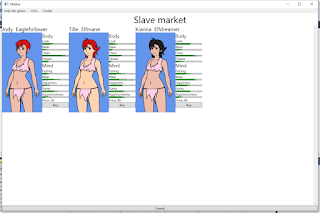
Now when buying a slave you can select between one of the three random slaves presented.
I added a new step event which is actually used in the buy slave in slave market event.
<ShowSlaveShop>
<ShopName>Slave market</ShopName>
<TraineeGenerators>
<RandomTraineeGenerator/>
<RandomTraineeGenerator/>
<RandomTraineeGenerator/>
</TraineeGenerators>
</ShowSlaveShop>
This is the exerpt of xml that shows the slave market shop.
As you can see it takes a name to show and a list of trainee generators.
At the moment only RandomTraineeGenerator exist which create a random trainee, with all skills to 0.
In future I'd like to add parameters to it, plus other generator that will give a bigger control over the trainee generation.
This will let the creation of different slave shops with different kind of slaves being sold.
I kinda restarted working on XMaker,
still update will be less frequent that when I started, mostly due to work.
Anyway in the last post you saw a big image whith a lot of slaves.
That was the result of working on the new buy slave view.

Now when buying a slave you can select between one of the three random slaves presented.
I added a new step event which is actually used in the buy slave in slave market event.
<ShowSlaveShop>
<ShopName>Slave market</ShopName>
<TraineeGenerators>
<RandomTraineeGenerator/>
<RandomTraineeGenerator/>
<RandomTraineeGenerator/>
</TraineeGenerators>
</ShowSlaveShop>
This is the exerpt of xml that shows the slave market shop.
As you can see it takes a name to show and a list of trainee generators.
At the moment only RandomTraineeGenerator exist which create a random trainee, with all skills to 0.
In future I'd like to add parameters to it, plus other generator that will give a bigger control over the trainee generation.
This will let the creation of different slave shops with different kind of slaves being sold.
Saturday, October 17, 2015
Still alive
Hello,
small post in order to show that I'm not dead.
I completed MGS5 and I'm no longer addicted to it, I still have a lot going on at work so before end of month there won't be (probably) any update here.
After that I'll probably still have to work a little on RPGAutoCAT since I have still some item in the backlog.
After that I hope I'll be fully operative.
Anyway, I'm start missing XMaker, I fired it up the other day just to see where I was with development and I'd like to show you a "small" picture.
Hope it doesn't wreak havoc on the blog layout :P

small post in order to show that I'm not dead.
I completed MGS5 and I'm no longer addicted to it, I still have a lot going on at work so before end of month there won't be (probably) any update here.
After that I'll probably still have to work a little on RPGAutoCAT since I have still some item in the backlog.
After that I hope I'll be fully operative.
Anyway, I'm start missing XMaker, I fired it up the other day just to see where I was with development and I'd like to show you a "small" picture.
Hope it doesn't wreak havoc on the blog layout :P
Tuesday, June 2, 2015
Good/Bad news
Hello people.
Today I come with good and bad news...
Which one would you like to hear first?
Ok, I'll start with the bad one:
This project is now officialy on hold.
Main reason for this is the lack of my writing and verbal skill, which have two major drawback:
a. Is very painful for me writing events
b. I created only low quality events.
Playing the game right now is really just: Meh!
Maybe it's just me that have high quality standards and get bored easily, I don't know I'll see what are the feedbacks (if any) in the next days.
So, what's the good news?
There are two good news and there's an announcement I'd like to make.
First the two good news:
The first one is that I'm a person that always try to keep my promises (and that's why I don't make them very often :) )
So, here's the preview I promised one month ago:
https://mega.co.nz/#!hgIzkbzR!-qb_yih19pAPhU_s6aRH6kFM50rTAKhUhrnh8TJb-9s
As I said don't expect much (and unfortunately being a preview comes with no tutorial and bad UI)
The second good news is that I never stop, I'm now working on another game.
I'm investigating incremental games and I'd like to create a hentai one.
Finally, the announcement:
I, as many other, falled for the old trap and created a Patreon campaign. Here's the link:
https://www.patreon.com/nixon28
If you think, after the bad news, that I'm still worth anything consider visiting my patreon page and pledge.
I'm not sure whether I'll continue to post on this blog for next games or create new blogs for them, but if I'll change the blog I'll make sure to post a note here.
Final note:
If you find bugs or crashes in XMaker consider contacting me even if I say the project is on hold, since I don't like to leave buggy code.
There's a bunch of button ingame that let you contact me, feel free to use them since I love feedback and in the future it might be implemented...
Today I come with good and bad news...
Which one would you like to hear first?
Ok, I'll start with the bad one:
This project is now officialy on hold.
Main reason for this is the lack of my writing and verbal skill, which have two major drawback:
a. Is very painful for me writing events
b. I created only low quality events.
Playing the game right now is really just: Meh!
Maybe it's just me that have high quality standards and get bored easily, I don't know I'll see what are the feedbacks (if any) in the next days.
So, what's the good news?
There are two good news and there's an announcement I'd like to make.
First the two good news:
The first one is that I'm a person that always try to keep my promises (and that's why I don't make them very often :) )
So, here's the preview I promised one month ago:
https://mega.co.nz/#!hgIzkbzR!-qb_yih19pAPhU_s6aRH6kFM50rTAKhUhrnh8TJb-9s
As I said don't expect much (and unfortunately being a preview comes with no tutorial and bad UI)
The second good news is that I never stop, I'm now working on another game.
I'm investigating incremental games and I'd like to create a hentai one.
Finally, the announcement:
I, as many other, falled for the old trap and created a Patreon campaign. Here's the link:
https://www.patreon.com/nixon28
If you think, after the bad news, that I'm still worth anything consider visiting my patreon page and pledge.
I'm not sure whether I'll continue to post on this blog for next games or create new blogs for them, but if I'll change the blog I'll make sure to post a note here.
Final note:
If you find bugs or crashes in XMaker consider contacting me even if I say the project is on hold, since I don't like to leave buggy code.
There's a bunch of button ingame that let you contact me, feel free to use them since I love feedback and in the future it might be implemented...
Monday, May 25, 2015
Creampie feature added
Hello, as I said in a previous post I didn't know whether creampie would make it in the preview.
Well, it will.
Currently there are 6 levels of creampie.
In the example below you can see level 4.

Puttin on a dress (slave skirt) that doesn't block the vagina will leave visible the cum

While putting on a dress (slave skirt + thong) that block the vagina will hide the cum

ATM there's no way to remove creampie but next step is to:
1. Wipe everything when taking a bath.
2. Gradually reduce it when week passes by.
3. Lower Clean and Purity stat every week when the slave goes around with a creampie.
Well, it will.
Currently there are 6 levels of creampie.
In the example below you can see level 4.

Puttin on a dress (slave skirt) that doesn't block the vagina will leave visible the cum

While putting on a dress (slave skirt + thong) that block the vagina will hide the cum

ATM there's no way to remove creampie but next step is to:
1. Wipe everything when taking a bath.
2. Gradually reduce it when week passes by.
3. Lower Clean and Purity stat every week when the slave goes around with a creampie.
Wednesday, May 20, 2015
GameOver event step
Hello there.
I added the GameOver event step this event step will be used to show the game over screen.
As I already said there are two types of GameOver:
1. Trainee gameover which means the slave just died.
2.Player game over, this type of game over will make use of the GameOver event step.
At the moment there's only one way for the player to game over.
When he has a negative amount of money, the player will have 4 turn to return to a positive amount.
If he can't, it's game over babe!
In future other game over could be implemented.
For example I can foresee an event where the player slip on a carpet and decapitate himself.
Maybe that's too random but there could be some event where the player is killed by monsters or by her trainee.
I added the GameOver event step this event step will be used to show the game over screen.
As I already said there are two types of GameOver:
1. Trainee gameover which means the slave just died.
2.Player game over, this type of game over will make use of the GameOver event step.
At the moment there's only one way for the player to game over.
When he has a negative amount of money, the player will have 4 turn to return to a positive amount.
If he can't, it's game over babe!
In future other game over could be implemented.
For example I can foresee an event where the player slip on a carpet and decapitate himself.
Maybe that's too random but there could be some event where the player is killed by monsters or by her trainee.
Friday, May 15, 2015
Hands
Hands, hands, hands, hands.
I hate hands.
I'm no good at drawing them.
You probably noticed in the previous post that something was missing.
You probably told yourself:
"Hmm, there's something wrong in this image."
"What could it be?"
"Hmm..."
"Maybe she's missing a beard"
Well, no. It wasn't a beard she was missing but hands.
So, finally I decided to do something about it...
Here it is (remember I'm not good at hand so no bashing)

What do you think?
Aren't those hands fantastic?
What?
No?
You must be blind to say so...
Anyway, if you didn't already left the page I'll tell you I'm joking.
The real hands are here down here.
|
|
|
|
|
|
|
|
|
|
|
|

I hate hands.
I'm no good at drawing them.
You probably noticed in the previous post that something was missing.
You probably told yourself:
"Hmm, there's something wrong in this image."
"What could it be?"
"Hmm..."
"Maybe she's missing a beard"
Well, no. It wasn't a beard she was missing but hands.
So, finally I decided to do something about it...
Here it is (remember I'm not good at hand so no bashing)

Aren't those hands fantastic?
What?
No?
You must be blind to say so...
Anyway, if you didn't already left the page I'll tell you I'm joking.
The real hands are here down here.
|
|
|
|
|
|
|
|
|
|
|
|
|
|
|
|
|
|
|
|
|
|
|
|
|
|
|
|
|
|
|
|
|
|
|
|
|
|
|
|
|
|
|
|
|
V
Just follow the arrow
|
|
|
|
|
|
|
|
|
|
|
|
|
|
|
|
|
|
|
|
|
|
|
|
|
|
|
|
|
|
|
|
|
|
|
|
|
|
|
|
|
|
|
|
|
|
|
|
|
|
|
|
|
|
|
|
|
|
|
|
|
|
|
|
|
|
|
|
|
|
|
|
|
|
|
|
|
|
|
|
|
|
|
|
|
|
|
|
|
|
|
|
|
|
|
|
|
|
|
V
A little more
|
|
|
|
|
|
|
|
|
|
|
|
|
|
|
|
|
|
|
|
|
|
|
|
|
|
|
|
|
|
|
|
|
|
|
|
|
|
|
|
|
|
|
|
|
|
|
|
|
|
|
|
|
|
|
|
|
|
|
|
|
|
|
|
|
|
|
|
|
|
|
|
|
|
|
|
|
|
|
|
|
|
|
|
|
|
|
|
|
|
|
|
|
|
|
|
|
|
|
V
Sorry, the truth there's no hand. I lied...
For today it's all..
What are you doing?
There's nothing down here.
Okay okay, you won.
Here are the hands.

I hope they are acceptable to the general public.
Subscribe to:
Posts (Atom)